Add the Panoptix Livescope™ scanning probe to your compatible plotter
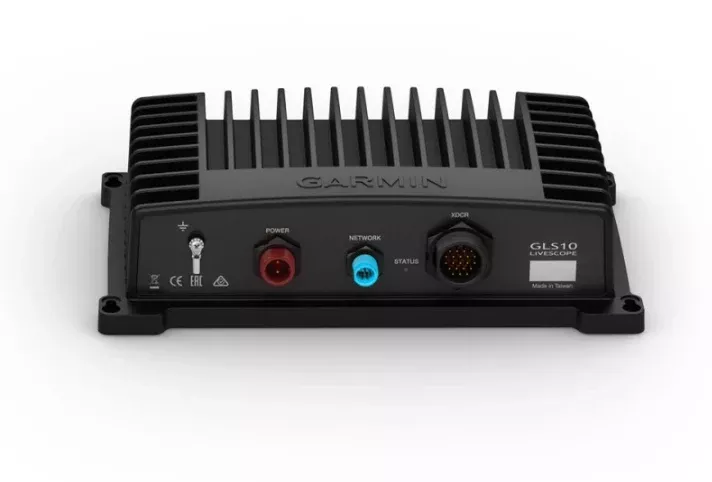
The GLS 10 black box probe module, easy to install and with the option of connecting to a network, is a real-time scanning probe. Add the LVS32 transducer model to see probe images that are easy to interpret and in real time, both of the structures and of the baits and fish that swim under or around the boat. In addition, you can easily share the images of the probe between different plotters connected to the network.
Panoptix LiveScope down
The LiveScope downward mode allows you to see incredibly detailed and easy-to-interpret probe images of both the structures and the fish under the boat, with exceptional clarity and at a distance of 60 m (200 feet), even when the boat is immobile.
Panoptix LiveScope forward
The forward LiveScope mode is an excellent method to explore the fishing spot before hooking. You will see incredibly detailed and easy-to-interpret probe images of both the structures and the fish that are around your boat. All this at a distance of 60 m (200 feet), even when the boat is immobile.
Specifications:
| Physical And Performance Characteristics | |
|---|---|
| Dimensions of the Unit (WIDTH/HEIGHT/DEPTH) | 24,5 X 14,9 X 6,5 cm |
| Weight | 2 kg |
| Water Resistance Classification | IPX7 |
| Temperature Range | Operation: from -15 °C to 70 °C |
| Electric | |
|---|---|
| Feeding Input | 10-32 V |
| Electricity Consumption | Typical 21 W; max. 58 W |
| FUSE | 7.5 A |
| Probe Specifications And Functions | |
|---|---|
| Frequency | 530 – 1,100 kHz |
| Transmission Power | 500 W |
| Maximum Depth | Down and forward: 61 m |
| Connections | |
|---|---|
| Garmin Marine Network Ports™ | 1 (small connector) |
FAQs
Update the Garmin chartplotter software after installation. See your owner’s manual for instructions.
Use a countersink bit to drill a clearance counterbore through only the top gel-coat layer to prevent cracking when tightening screws.
Always wear safety goggles, ear protection, and a dust mask when drilling, cutting, or sanding to avoid possible personal injury.
Black electrical tape is recommended for securing the cable above and below the rotating joint to avoid damage. Zip ties can be used if not over-tightened.
Screws are included but may not be suitable for all mounting surfaces. You must determine what screws/hardware are needed for your surface.
Align the top of the transducer with the bracket, secure with the included hex wrench, shoulder screw, rubber washer, and flat washer. Recommended torque on the shoulder screw is 2.5 lb-ft (3.4 N-m).
Maintain a compass-safe distance of at least 178 mm (7 in.) from the GLS 10 module.
An optional spray shield accessory (010-12406-00) can be installed to reduce spray from the transducer.
Mount the sonar module in a location with adequate ventilation, where it will not be exposed to extreme temperatures, and where the LEDs are visible, the cables can be connected, and the device will not be submerged.
If the LED blinks red three times followed by a 3-second pause, the transducer is not detected; check wiring connections if this persists.
You should avoid routing the transducer cable near electrical wires or other sources of electrical interference and ensure the cable is not pinched when the trolling motor is deployed or stowed.
No tools are necessary—turn the mount one click to change the orientation from forward to down.
Mount the transducer far from the motor shaft to avoid magnetic interference, deploy it in water, and use the ‘Calibrate Compass’ menu from your sonar view.
Contact the SailRACE team — as certified marine experts we’re happy to help with product selection, installation and after-sales servicing, before and after your purchase.